


Sudoku.com - Sudoku Puzzle
4.786.25K Reviews
App Specs
- Version
- 7.8.0
- Updated On
- License
- Free
- Downloads
- 100,000,000+
- Developer
- Easybrain
- Categories
- Puzzle
- Platform
- Android, iOS
Screenshots



 Analysis by AppCompare
In my household, a puzzle app can become a shared object as easily as a book left on the coffee table: one person starts a grid, someone else notices it, and suddenly there is a small debate over the next move. Sudoku.com - Classic Sudoku suits that casual handoff well because its familiar nine-by-nine format is easy to understand without a tutorial. I like it best as a personal puzzle that can be shown to another person, though, rather than a family game built around shared progress or coordinated turns.
Taking turns without losing your place
A realistic use for it is a quiet stretch after dinner. I might open a puzzle while waiting for tea to steep, then let a relative inspect the grid and suggest a candidate number. Pencil notes make that sort of conversation easier: instead of arguing from memory, we can compare possibilities in the relevant cells. The catch is that two people sharing one device can also overwrite or erase each other’s work, so I’d agree on who is entering numbers before passing the phone around.
That distinction matters if you are looking for a group activity. Sudoku is naturally a solo logic challenge, and this app does not need to be treated like a multiplayer game to be enjoyable. A family can talk through a puzzle together, but each person’s progress and preferred solving style may differ. For a lively game night where everyone contributes at once, a dedicated party game is a better fit; this is more satisfying when one player solves and others offer occasional suggestions.
Keeping shared-device expectations clear
Before handing over a phone, I would check whose puzzle is currently open and whether the next player is comfortable continuing it. A half-filled grid can look like an invitation, but it may represent someone’s careful chain of deductions. Starting a fresh puzzle or changing entries without asking can spoil that work. The simple household rule I recommend is to finish the current board, or agree explicitly that it is being handed over, rather than assuming a shared screen means shared ownership.
I would also keep expectations modest about coordination. Daily puzzles can give people a common topic—“How did you approach that section?”—but they are not a substitute for a shared family account or a system for assigning turns. If everyone wants an independent record of their own play, using separate devices is more straightforward than trying to make one phone serve as a communal notebook. That is a practical boundary, not a flaw in the puzzle itself.
Age, learning, and trust
The game is rated for Everyone, and the rules are approachable for a child who can work with numbers and follow a grid. I would still introduce it with a small explanation: Sudoku is about placing digits so they do not repeat in a row, column, or box, not about doing arithmetic. That helps younger players avoid treating it as a calculation test. For a beginner, starting with an easier puzzle and using pencil notes can make the first attempt feel like reasoning rather than guesswork.
As a parent or caregiver, I would judge the experience by the child’s comfort with independent puzzle-solving, not by the age label alone. A harder board can become frustrating if a new player has not learned to scan systematically, while a more experienced child may enjoy working without help. Hints can be useful as a teaching prompt, but I would ask the player to explain the reasoning after using one; otherwise, tapping for assistance can replace the learning moment. The app is a puzzle, not a substitute for an adult’s choice about how a child uses a shared device.
Worth Reading Before You Choose

Flipboard Shows What News Apps Must Do Beyond the Feed

Switching to Android Auto Means Rethinking Your Driving Routine

Google Calendar Makes a Crowded Week Easier to Manage

Ludo King Makes the Most of the Minutes Between Plans

Baby Panda World Brings Quick Play to Modern Phones, but Its Game Library Feels Busy

ESPN’s Live Game View Makes Following Close Games Easier
Who will enjoy this particular version
Easybrain’s Sudoku is a strong match for someone who wants a familiar logic puzzle ready to open during a short break, and its daily challenges give regular players a reason to return. It also works for people who prefer digital pencil marks to keeping track of handwritten candidates. The game is free, with in-app purchases priced from $2.49 to $14.99 per item, so I would treat any purchase as optional rather than necessary to understand the basic appeal.
It may be the wrong choice if you want elaborate story progression, direct competition, or a cooperative mode in which several players have distinct roles. It is also not ideal for someone who finds number grids tiring or wants a puzzle that can be solved through wordplay or visual clues instead. Compared with a printed Sudoku book, the app offers convenient note-taking and hints, but paper gives you more freedom to mark up a board and avoids screen use. Compared with a general puzzle collection, this is more focused: a good thing if Sudoku is what you want, limiting if you need variety.
What to know before making it a habit
One useful way to avoid turning hints into an answer button is to set a personal rule: scan the row, column, and box first, write down candidates, then use a hint only when you can no longer explain the next step. Pencil mode is most helpful when used selectively. I would note candidates only in cells where they narrow a real choice, rather than filling every empty square with possibilities; too many marks can make a board harder to read and create extra cleanup when a number is placed.
Difficulty labels are a guide, not a promise that every puzzle will feel equally hard. A player who breezes through one board may still hit a snag on another, so I would change levels based on whether the solving process stays enjoyable, not on pride in choosing the toughest setting. If you are new, solving slowly and checking each placement is more useful than racing. If you already know Sudoku well, the app’s straightforward presentation is convenient, though someone seeking unusual rule variations may prefer a specialist puzzle source.
For anyone wondering whether it is suitable for quick sessions, yes: a grid can be picked up during a pause and revisited when there is more time. The trade-off is that a puzzle may require sustained attention, so it is not always a good fit for a moment when you expect constant interruptions. I would avoid entering a number while distracted, especially if another person is also using the device; one mistaken tap can make later deductions confusing. A calm, focused few minutes usually feels better than trying to solve while juggling several tasks.
Getting Started with the Game
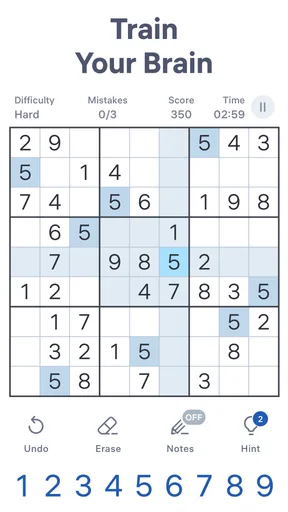
When you first open Sudoku.com - Classic Sudoku, you're greeted with a clean, intuitive interface that makes you feel right at home. The app offers a variety of difficulty levels ranging from "Easy" for beginners to "Expert" for those who really want to test their skills. I started on "Medium" to get a feel for it, and it was just the right level of challenging without being too frustrating.
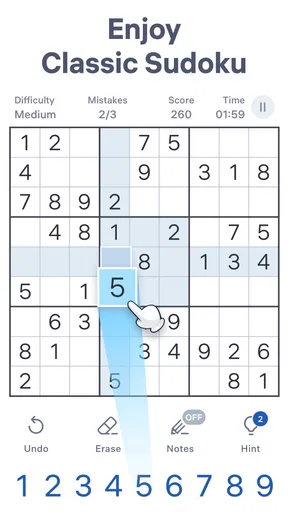
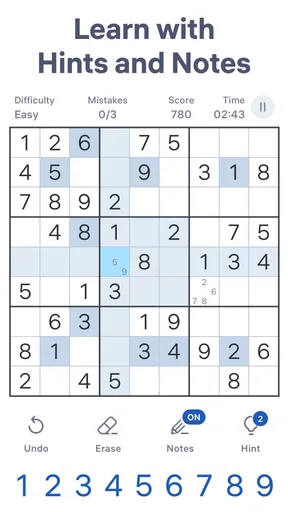
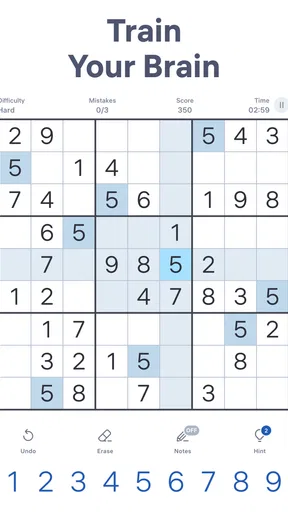
The game board is neatly laid out, and the numbers are clear and easy to tap. One of the features I absolutely love is the pencil mode, which lets you make notes in each square, just like you would in a physical Sudoku book. This is super helpful when you're trying to figure out potential numbers for a tricky spot.
User-Friendly Features
One thing that really stood out to me was the hint system. Sometimes you get stuck, right? Well, the app has a handy hint button that not only gives you a little nudge in the right direction but also explains why a certain number fits in a particular square. It’s a great way to learn and improve your skills while playing.
Another cool feature is the daily challenges. These puzzles are a fun way to keep you coming back every day. Plus, completing them earns you trophies, which is a neat little incentive to keep those brain cells active.
Design and Aesthetics
Let’s talk about the design for a second. The developers did a fantastic job with the aesthetics. The colors are easy on the eyes, and you can even switch to a dark mode if you’re playing at night or just prefer a darker theme. The app runs smoothly, and I didn’t experience any lag or glitches while playing, which is always a win in my book.
The version currently available is 7.6.0, and the game is made by Easybrain. Its scale is reassuring for anyone who likes to choose established titles: it has a 4.7 average from around 2.4 million ratings, alongside roughly 85,000 written reviews and over 100 million installs. Those figures don’t guarantee that every player will enjoy it, but they do suggest that this is a familiar, well-used take on classic Sudoku rather than an obscure experiment.
For a shared phone or tablet, the readable board and dark theme are practical touches, especially when one person is playing in a dim room and another may want to glance at the grid. Still, I would not assume that a single device is a good way to keep separate household routines organized. The daily challenge can be a shared conversation starter, but each player should be clear about whether they are continuing someone else’s board or beginning their own.
Why You Should Download It
If you’re a fan of puzzles or just looking for a way to pass the time while sharpening your mind, this app is definitely worth the download. It’s perfect for those moments when you have a few minutes to spare, whether you’re commuting, waiting in line, or just lounging on the couch.
One thing I really appreciated was the lack of intrusive ads. They do exist, but they are not overwhelming, which is a rare find in free apps these days. It’s like the app respects your playtime, and that’s something I can get behind.
Wrapping It Up
Overall, Sudoku.com - Classic Sudoku is a fantastic app for anyone who loves a good puzzle. It’s user-friendly, aesthetically pleasing, and packed with features that enhance your gaming experience. Whether you’re a Sudoku newbie or a seasoned pro, this app has something for everyone.
There is a useful distinction between choosing a free game and deciding whether to spend within it. The core appeal is the act of solving grids, so I would first try the difficulty range and pencil mode before considering an in-app purchase. If you are setting it up for a child or a shared household device, make purchase expectations clear in advance and keep the device owner involved in any buying decision. That simple conversation avoids treating a puzzle’s optional extras as part of the rules.
The app is available at no charge, carries an Everyone age rating, and requires Android 8.0 or later on Android devices. Those details make it easy to assess basic fit before installing, while the actual best fit still depends on how a person responds to number puzzles and screen-based play. I would recommend it to someone who wants an accessible, focused Sudoku companion, not to someone hoping for a broad collection of different games or a coordinated family competition.
So, if you haven’t already, give it a try. It’s available for both Android and iOS, and you can find the download links on our website. Trust me, your brain will thank you!
Pros
- Intuitive user interface.
- Daily challenges enhance skills.
- Multiple difficulty levels available.
- Hints and tips for beginners.
- Offline play supported.
Cons
- Contains in-app ads.
- Limited free hints.
- Occasional app crashes.
- Ads interrupt gameplay.
- Some puzzles are repetitive.
FAQs for Sudoku.com - Sudoku Puzzle
What features does Sudoku.com – Classic Sudoku offer?
Sudoku.com – Classic Sudoku provides a variety of features to enhance your puzzle-solving experience. It includes multiple difficulty levels, daily challenges, hints, and automatic error checking. The app also offers a clean, user-friendly interface and soothing themes, making it suitable for both beginners and seasoned players. Additionally, performance tracking helps monitor your progress.
Is Sudoku.com – Classic Sudoku free to use?
Yes, Sudoku.com – Classic Sudoku is free to download and play. However, it offers optional in-app purchases for premium features, such as ad removal and additional themes. While the free version provides a comprehensive experience, purchases can enhance gameplay by offering a more personalized and uninterrupted experience.
Does Sudoku.com – Classic Sudoku require an internet connection?
Sudoku.com – Classic Sudoku can be played offline, allowing you to enjoy solving puzzles without an internet connection. This makes it perfect for commuting or traveling. However, features like daily challenges and certain updates may require connectivity to access the latest content and sync your progress.
How does Sudoku.com – Classic Sudoku ensure a fair challenge?
The app employs a sophisticated algorithm to generate puzzles that are solvable and fair. Each puzzle has a unique solution, ensuring a genuine challenge. The difficulty levels range from easy to expert, providing players with puzzles that match their skill level, thus allowing steady improvement over time.
Can I track my progress in Sudoku.com – Classic Sudoku?
Yes, the app includes a progress tracking feature. It records your completed puzzles, the time taken, and your best scores. This allows you to monitor improvement and challenge yourself to beat previous records. Additionally, it offers insights into your playing habits, helping you hone your skills effectively.


